
How to Update the Plan on Essential Trust Badges & Icons (and How Views Work)
Essential Trust Badges & Icons uses a views-based system. This article explains how plans are updated, how views are counted, what happens when limits are reached, and when views reset.
📌 Important Things to Know About Plans & Views
- Plans are managed directly through Shopify
- Views are not unique visitors
- Every widget load counts as a view
- You will not be billed for exceeding your view limit
- If the monthly view limit is exceeded and no upgrade is made, badges may be unpublished after 3 days, following email notification
- Views reset on the 1st day of each month
1️⃣ How to Update Your Plan
You can upgrade or downgrade your plan directly inside the app.
Steps:
-
Open Essential Trust Badges & Icons
-
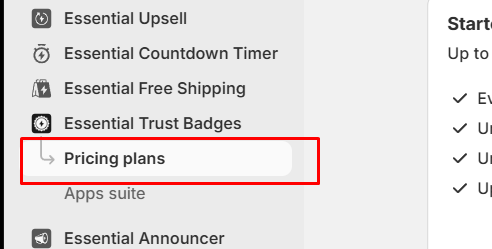
Go to Pricing Plans
-
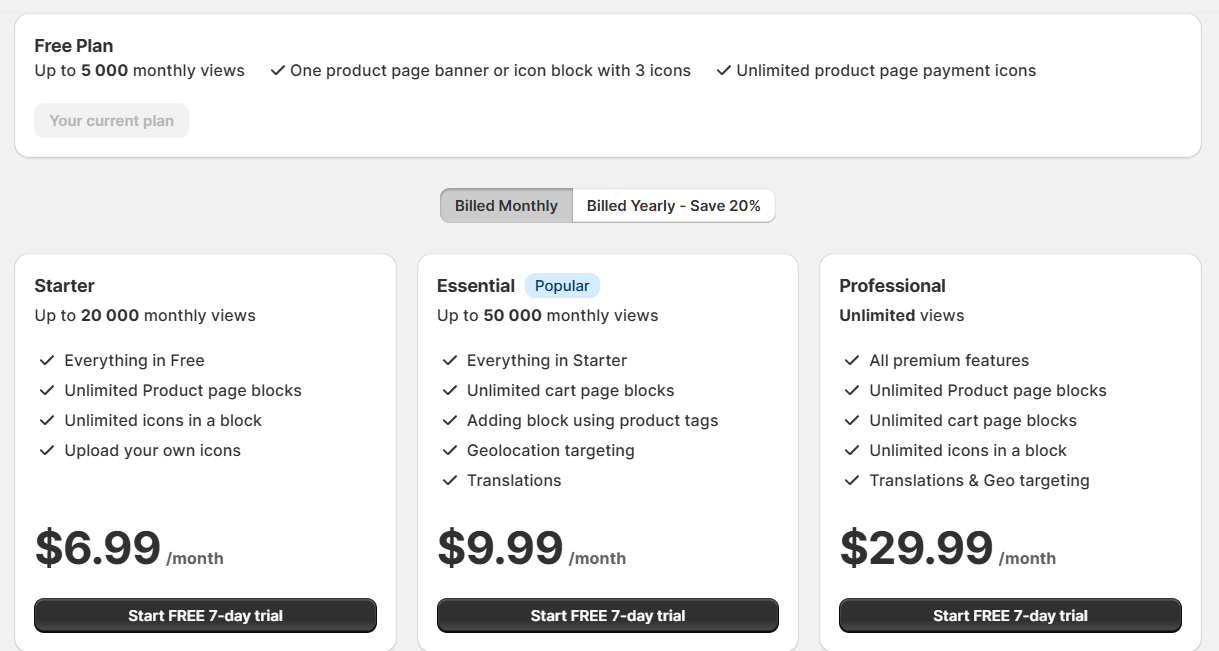
Select the plan you want
-
Confirm the change in Shopify’s billing window
Shopify handles all billing and subscription changes.
📌 Note: Uninstalling the app will automatically cancel any active paid plan.
2️⃣ How the Views Counter Works
The views counter does not track unique visitors.
A view is counted every time a Trust Badge widget loads on your website.
This means:
- One visitor can generate multiple views
- Refreshing the page counts as a new view
- Navigating between product pages counts multiple views
- Having multiple widgets published increases view usage
- Views are not counted when testing widgets in Preview mode or within the Theme Customizer.

The system cannot distinguish between visitor types. All widget loads are counted equally.
3️⃣ What Happens When You Reach Your Monthly Views Limit
If your store reaches the monthly views limit for your plan:
- You will not be charged extra
- You will receive an email notification prompting you to upgrade your plan.
- If the plan is not upgraded within 3 days, the Trust Badges will be unpublished automatically
4️⃣ When Do Views Reset?
- The views counter resets automatically on the 1st day of each month
- No manual action is required
- Once reset, published badges can display again (depending on plan limits)
5️⃣ What Happens After Downgrading or Cancelling a Plan
- Plan changes are handled by Shopify
- After downgrade or cancellation:
- Free plan limits will apply
🧠 Tips to Manage View Usage
- Avoid publishing unnecessary or duplicate badges
- Limit badges to key product pages
- Be mindful when placing badges across many products or collections
- Remember that you browsing your own store also counts as views
✅ Notes
- Views are counted per widget load, not per visitor
- Exceeding view limits does not result in extra charges
- If limits are exceeded and no upgrade is made, badges are unpublished after 3 days
- Views reset automatically on the 1st of every month
- All plan changes are managed through Shopify
If you have questions about your current usage or which plan fits your store best, our support team is always happy to help 💙