
How Pricing Plans Work in Essential Upsell & Cross Sell app
In this guide, we’ll walk you through what happens when you install the app, how the 14-day free trial works, how billing and revenue-based plans are handled, how revenue is calculated, how automatic plan adjustments work, and how manual plan changes work. Everything is explained in a step-by-step, simple, and beginner-friendly way!
📌 Important Things to Know Before You Start
- When you install the app, your store starts with "No Active Plan"
- The Free plan requires approval of a potential app charge from Shopify, even though it starts with a free (This is only an authorization and does not result in an immediate charge.)
- Without approving the Free plan, your store remains on “No plan” and you won’t be able to publish any upsell offers.
- Once the Free plan is approved, it includes a 14-day free trial, and you won’t be charged anything during these first 14 days if you remove the application with this period of time.
- After the free trial, your plan automatically adjusts based on the additional revenue generated by the app (when upsell items are added from our application and the order is completed).
- You’ll receive email notifications from info@essentialupsell.com when you are moved to a higher paid plan.
- You can change your plan manually at any time from the Pricing Plans page within the app.
- If you uninstall the app within the first 14 days, you won’t be charged at all.
-
Any billing issues or refunds are handled quickly by the 24/7 support team.
Let’s walk through everything step by step 👇
1️⃣ App Installation and Plan Assignment
When you install Essential Upsell & Cross Sell from the Shopify App Store, your store initially starts with no active plan.
To activate the app:
- You must approve the Free plan from the Pricing Plans page.
- Shopify will ask you to approve a potential app charge, even for the Free plan.
-
This approval is required by Shopify and is just an authorization, so it does not result in an immediate charge.
⚠️ Important:
If the Free plan is not approved, your store stays on “No plan”. With no active plan, you can explore the app dashboard, but you cannot publish any upsell offers.
2️⃣ Is the App Free or Paid?
Once the Free plan is approved, your store is placed on this plan with a 14-day free trial. You will be able to publish your first upsell and test the app without any upfront cost.
During this trial period:
- You won’t be charged anything.
- You can create and publish upsell offers.
- If you uninstall the app within the first 14 days, no charges will be applied.
After the trial:
- The app moves to an additional revenue-based pricing model.
- Your plan adjusts automatically to a higher-tier paid plan depending on how much revenue the app generates for your store.
- You’ll always be notified via email when you are upgraded to a higher paid plan.
-
You can also change your plan manually at any time from the Pricing Plans page.
👉 There are no unexpected charges, and all billing is handled transparently through Shopify.
3️⃣ How Revenue Is Calculated
The total revenue is calculated by summing the value of all products that are added and purchased through the app’s add-to-cart buttons once the order is completed.
Please note that for Frequently Bought Together offers, the app counts the Trigger Item as part of the added revenue. This applies even if a discount is not applied to the trigger item at that moment, because:
- Most merchants apply the discount to the trigger item.
- Including the product in the upsell or applying a discount to the trigger item motivates customers to purchase it as well.
4️⃣ How Billing Works
All billing is handled through Shopify Billing:
- Charges appear directly on your Shopify invoice.
-
There are no external or hidden payments.
At this time:
- Your plan will not change automatically due to store traffic or order volume alone.
- Plans are upgraded only based on additional revenue generated by the app.
5️⃣ How to Update or Change Your Plan
If you’d like to:
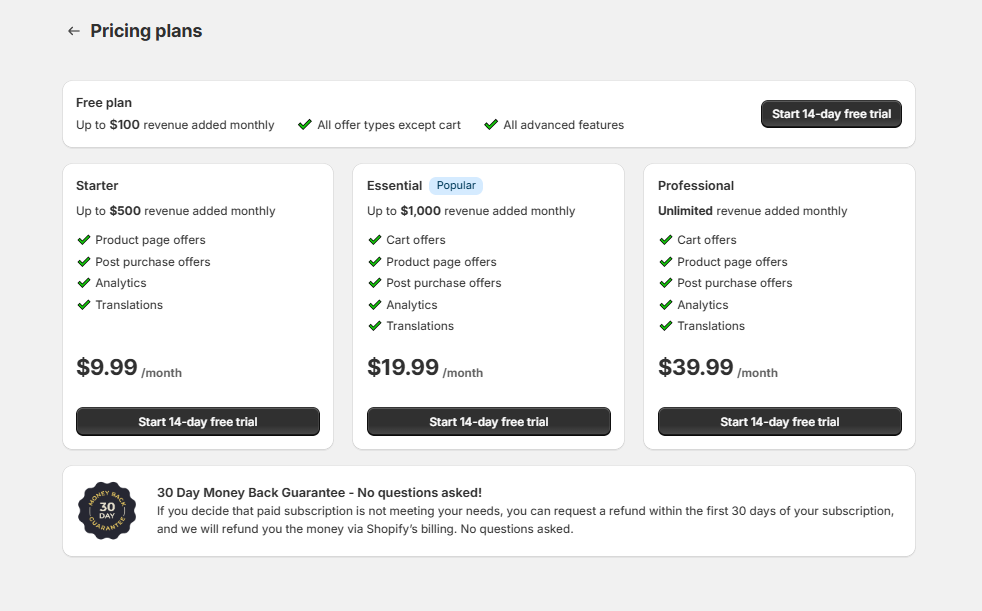
- Update your plan (i.e., if you want to publish a Cart Page Upsell Offer, you need to have at least an Essential plan),
- Switch to a different plan
-
Check which plan you’re currently on
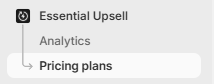
You can do this by using the app dashboard and accessing the Pricing Plans section.
You can also check this guide for detailed instructions on how to cancel or downgrade your plan: How to cancel the paid plan on Essential Upsell & Cross Sell App
✅ Final Summary
Essential Upsell & Cross Sell app:
- Starts in a No plan state after installation.
- Requires approval of the Free plan before any upsell offers can be published.
- Includes a 14-day free trial once the Free plan is approved.
- Requires approval of the maximum app charge before publishing upsells (authorization only).
- Can be automatically upgraded based on the additional revenue generated by the app.
- Sends email notifications when the plan is upgraded.
- Allows manual plan changes at any time from the Pricing Plans page.
- Handles all charges and credits through Shopify Billing.
- Applies credits automatically if you downgrade.
If you have any questions about pricing, billing, plan changes, revenue calculations, or refunds, our support team is always happy to help and available 24/7 at support@essential-apps.com 💙