
Upsell Not Showing: Main Reasons and Solutions
If an Upsell Funnel isn’t appearing on your Shopify store, it’s usually due to one of a few common reasons. Below you’ll find the main causes and the steps you can take to fix each one.
1️⃣ Offer Items Are Out of Stock
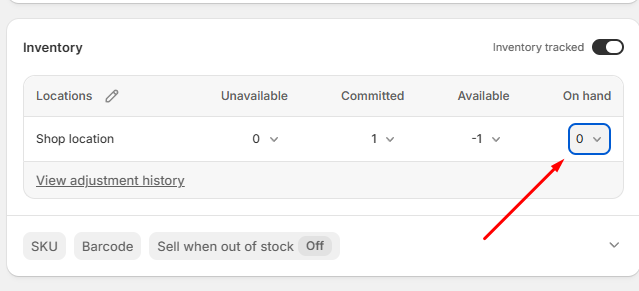
One of the possible reasons the upsell may not show is that the products you are trying to offer are not in stock. If the offer items are out of stock and inventory tracking is enabled, the upsell will not appear.
In case the products you are trying to offer are out of stock, you can:
- Restock them
-
Disable inventory tracking for those items
You can change those settings by accessing your product settings in your Shopify Admin:
How to Fix It
- Go to Shopify Admin → Products
- Open the offer product
- Increase the "on hand" number of the product OR Disable its "Inventory tracked" switch
2️⃣ Offer Items Are Not Published
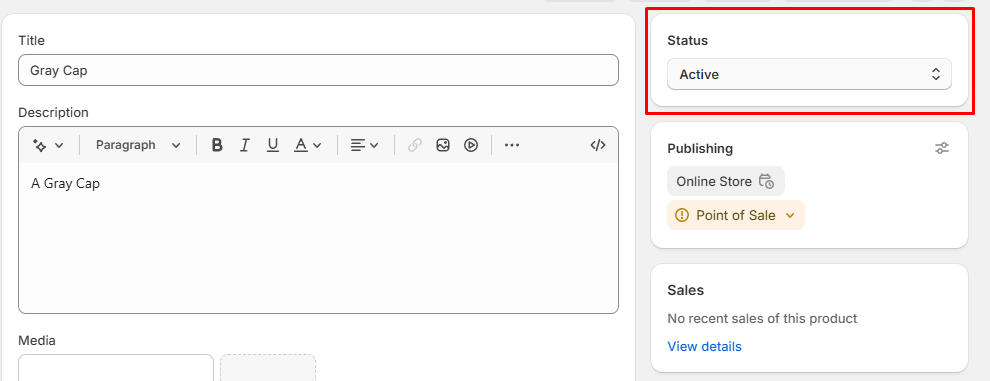
Upsell offer items must be published and available on your Online Store sales channel. If a product is in draft status or not accessible from the live store, it will not appear in the Upsell Funnel.
How to Fix It
- Go to Shopify Admin → Products
- Open the offer product
- Make sure the product status is set to Active
-
Confirm you can access that product from your live store
3️⃣ Offer Items Are Already in the Cart
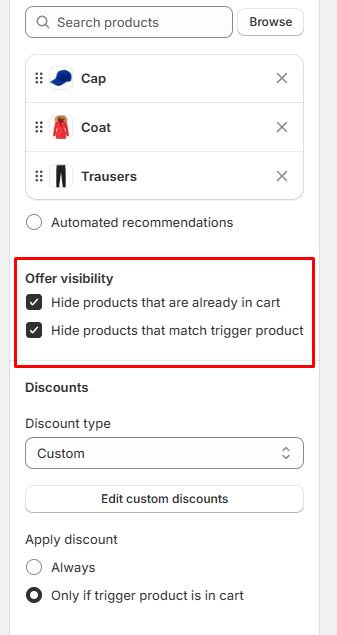
If the Upsell Funnel will not display some of the offered products or the upsell is not showing at all, it could be because the features "Hide products that are already in cart" or "Hide products that match trigger product" are currently enabled on your upsell:
How to test if this could be the issue
- Open an incognito tab
- Visit a trigger product page or add it to the cart (For cart page type of upsell)
-
Upsell will show on the product page or the cart drawer/main cart page in incognito and not while normally browsing
How to Fix It
- Remove the offered products from the cart
- Refresh the page and trigger the upsell again
- Disable the feature if not needed
4️⃣ App Embed Is Disabled
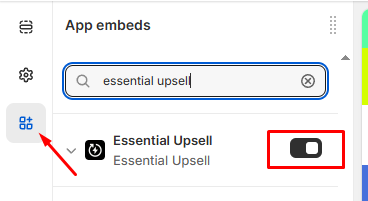
If the app embed is turned off, upsells will not appear on your storefront.
How to Fix It
- Go to Online Store → Themes
- Click Customize on your active theme
- Open App embeds from the top-left menu
- Enable Essential Upsell & Cross Sell
- Click Save to apply the changes
Still Having Issues? Contact Support 💬
If you’ve checked:
- Product stock and inventory settings
- Product publish status
- Mentioned features to hide products enabled
- Cart content
- App embed configuration
and the Upsell Funnel is still not appearing, our support team is here to help.
We’ll be happy to assist and get everything working smoothly 🚀