
How to Publish Your AI-Generated Articles
Overview
The Essential AI Blog app is a powerful content generation tool. It is designed to create high-quality blog posts, but it does not control the final layout, visibility, or publishing schedule on your storefront.
Important: Once a post is generated, it is sent to your Shopify admin as a "Hidden" draft. You must manually set it to "Visible" within Shopify for it to appear on your website.
How to Publish an Article
After generating the post in the app:
Review Content: We recommend reviewing the tone, structure, and SEO settings to ensure they align with your brand.
-
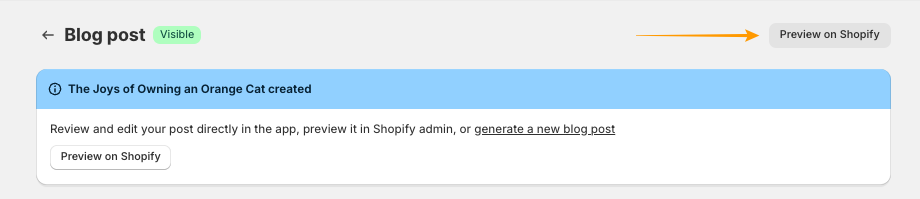
Click Preview on Shopify.
-
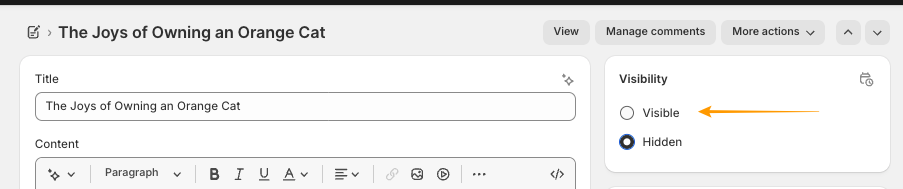
In the right-hand sidebar of the Shopify editor, change the status from Hidden to Visible.
-
Click Save.
Once the post is marked as visible, it will appear on your store’s Blog page.
How to Manage Blog Post Visibility in Bulk on Shopify
If you have generated multiple articles and want to publish them all at once, you can do so through Shopify’s bulk editor.
To do this:
- From your Shopify admin, go to Content > Blog posts.
- Select the checkboxes next to the articles you wish to update.
- Click the Set as visible button.

This way, you can quickly publish and hide multiple articles at the same time, keeping your store content organized and up to date.
Where is my post?
If you have marked a post as "Visible" but it still isn't appearing on your site, please note:
- Theme Settings: Your Shopify Theme determines how and where blog posts are displayed.
- App Limits: The Essential AI Blog's main duty is to generate the text for the Blog Post, and to make sure the content is delivered to your Shopify admin. For issues regarding website design, navigation menus, linking, or missing blog pages, please consult your Shopify Theme developers or Shopify Support at https://www.shopify.com/contact