
Email Tracking in Essential Preorder
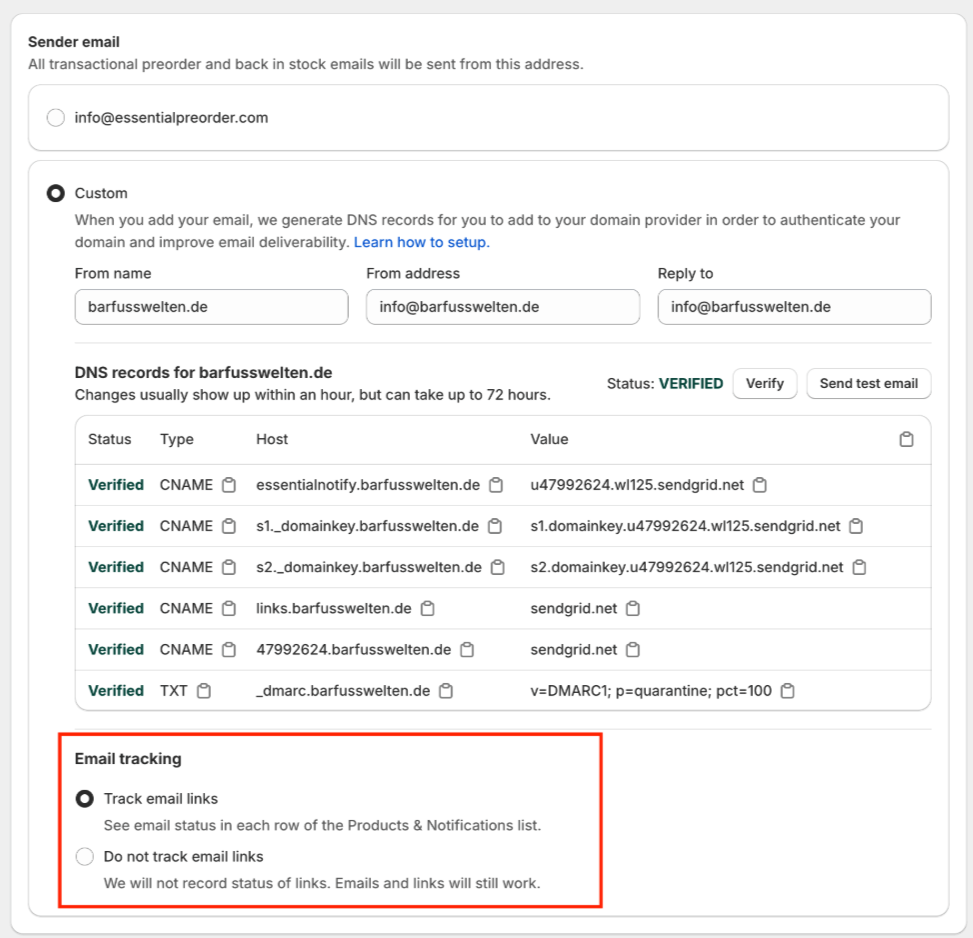
Email tracking helps you see how your preorder and back-in-stock emails perform. You can track opens (and, depending on your setup, link tracking). If your store uses a custom sending domain, tracking may route links through your domain. When your domain does not have a valid HTTPS (SSL) certificate, some customers may see a security warning when clicking links.
This article explains how tracking works, when to disable it, and what you lose by turning it off.
What is Email Tracking?
When Email tracking is enabled, Essential Preorder records engagement with your transactional emails, such as:
- Open tracking: whether an email was opened
- Link tracking: whether email links were clicked (when enabled)
You’ll see tracking status in the app (for example, in your Notifications list).
Why you might see a warning about HTTPS

If you use a custom sender domain, tracking can open links through your domain. This is normal.
But if your domain has an invalid or expired HTTPS certificate, email links may open with a security alert for your customers.
You may see a banner like:
“HTTPS not detected for your domain… Without HTTPS, some customers may see a security warning.”
This usually happens when:
- your domain or tracking subdomain does not have an active SSL certificate
- the certificate expired
- HTTPS is not configured for the tracking domain you’re using
Your options
Option 1: Fix HTTPS (recommended)
If you want tracking and the best customer experience, make sure your domain has a valid SSL certificate.
Common fixes:
- enable SSL/HTTPS with your domain provider (or hosting platform)
- renew an expired certificate
- ensure the tracking subdomain you use is covered by HTTPS
Once HTTPS is valid, customers should no longer see link warnings.
Option 2: Turn off tracking (fastest workaround)
Disabling tracking prevents the tracking redirect behavior that can trigger warnings when HTTPS is missing or invalid.
This is the quickest way to avoid customer-facing alerts.
What you lose when tracking is off
If you disable tracking:
- Email links will still work
- Emails will still send normally
- Opens will not be recorded
- Link clicks will not be recorded
- You won’t see engagement status in the app
In short: you keep deliverability and functionality, but lose reporting.
How to enable or disable Email tracking
- In your Shopify admin, open Apps → Essential Preorder
- Go to Settings (or Sender email, depending on your screen)
-
Scroll to Email tracking
Choose one of the options:
- Track email opens / Track email links
- Do not track email opens / Do not track email links
- Click Save
If your domain does not have HTTPS, we will show a warning banner and recommend turning tracking off or fixing HTTPS.
Recommended setup
- If you use a custom sender domain: Fix HTTPS and keep tracking on
- If you’re seeing security warnings today and need a quick fix: Turn tracking off, then fix HTTPS later
Troubleshooting
Customers see a security warning when clicking email links
- Turn off tracking to stop warnings immediately
- Then fix HTTPS for your domain and re-enable tracking
I turned tracking on, but don’t see open/click data
- Tracking only applies to emails sent after you enable it
- Some email clients block tracking pixels, so open tracking may be underreported