
How to Update Your Plan on Essential Estimated Delivery Date (and How Views Work)
Essential Estimated Delivery Date uses a views-based pricing model, which means your plan is based on how many times your delivery estimate widgets are shown on your store each month.
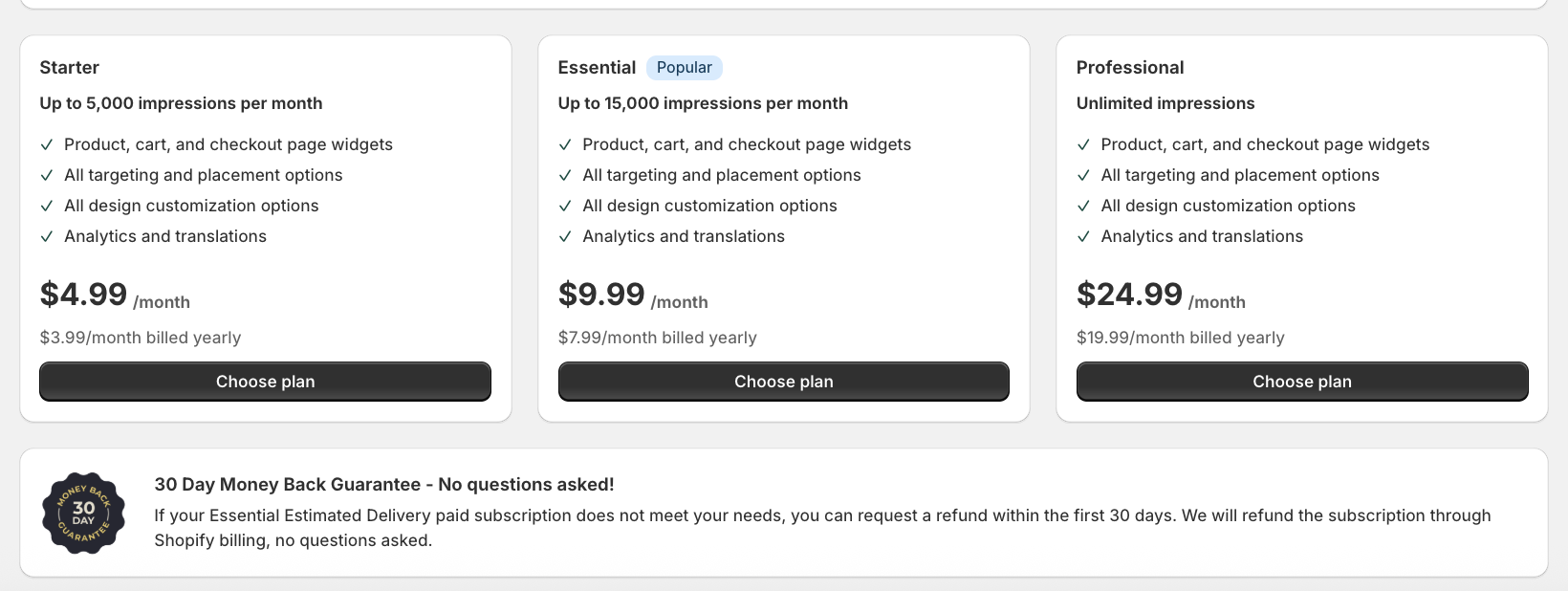
Every feature is included on every plan. The only difference between plans is the number of views included.
In this guide, we'll explain:
- How to upgrade or downgrade your plan
- How views are counted
- What happens when you reach your monthly limit
- When views reset and what to expect
This will help you better understand your usage and avoid surprises 😊
Let's walk through it step by step 👇
📌 Before We Start – A Few Important Things to Know
- All plan changes are handled directly by Shopify
- Every plan includes all features — only the view limit changes
- Views are not based on unique visitors
- Every time a delivery estimate widget loads, it counts as a view
- You will not be charged extra for exceeding your view limit
- If you reach your limit, your widgets pause until your views reset or you upgrade
- Views reset on the day your monthly cycle started, not on the 1st of the calendar month
1️⃣ How to Update Your Plan
You can change your plan at any time directly from inside the app.
Steps:
-
Open Essential Estimated Delivery Date
-
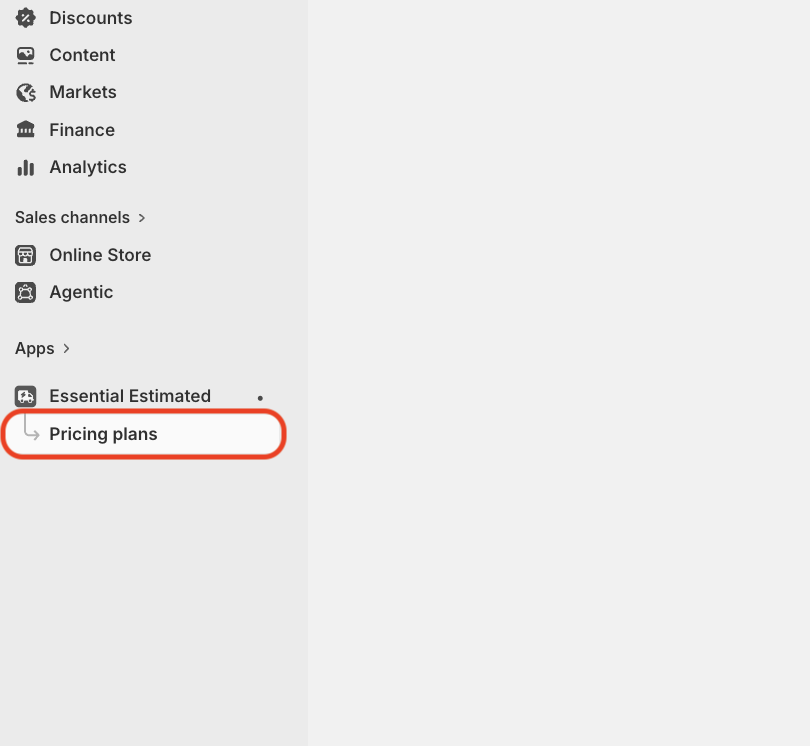
Go to Pricing plans from the left-hand menu
-
Choose the plan you'd like to switch to
-
Confirm the change in Shopify’s billing window
Once confirmed, Shopify automatically applies the change. No additional setup is required, and your widgets go live again immediately if they were paused.
📌 Good to know: If you uninstall the app, Shopify will automatically cancel any active paid plan.
2️⃣ How Views Are Counted (Very Important)
The views counter does not track unique visitors. A view is counted every time a delivery estimate widget loads on your store.
This means:
- One visitor can generate multiple views
- Refreshing the page counts as a new view
- Visiting multiple pages with delivery estimates counts multiple views
- Showing widgets on the product page, cart and checkout counts each time one loads
- Publishing multiple widgets increases total views
- Views are not counted when testing widgets in Preview mode or within the Theme Customizer

Because the system can't distinguish between visitor types, all widget loads are counted equally.
📌 Note: In the app, views are shown as impressions (for example, "Current cycle impressions" on the Pricing plans page).
3️⃣ What Happens When You Reach Your Monthly View Limit?
If your store reaches the monthly view limit for your plan:
- You will not be charged for extra views
- You will receive an email notification
- Your published delivery estimate widgets take a rest — they stop appearing on your storefront
While your widgets are resting, shoppers will not see delivery dates on your store. This prevents additional views from being counted.
📌 Important: Pausing does not delete your widgets. All of your settings, designs and rules stay saved in the app. Your widgets become active again automatically when your views reset, or immediately if you upgrade.
4️⃣ When Do Views Reset?
Views reset automatically at the end of your monthly view cycle.
Your cycle is based on the date your current cycle started, not on the 1st of the calendar month. For example, if your cycle started on 12 September, it resets on 12 October.
- You can see your cycle start and reset dates on the Pricing plans page
- No manual action is required
- Once reset, your widgets become active again automatically
- View usage starts counting from zero for the new cycle
5️⃣ What Happens After Downgrading or Cancelling a Plan?
If you downgrade or cancel your plan:
- Free plan limits will apply
- All features remain available, because every plan includes every feature
- If your store has already passed the free plan's view limit for the current cycle, your widgets may pause until the cycle resets
- No additional charges will be applied for exceeding limits
All billing adjustments follow Shopify's standard subscription rules.
💡 Tips to Manage Your Views
Here are a few simple ways to keep your view usage under control:
- Show delivery estimates only on the pages where they help shoppers decide
- Remove or unpublish widgets you're no longer using
- Be mindful when showing widgets across many products or collections
- If several widgets can appear on the same page, check whether you need all of them
- Check your usage on the Pricing plans page before a busy sales period
✅ Notes
- Views are counted per widget load, not per visitor
- Exceeding your view limit does not cause extra charges
- Widgets pause when the limit is reached and return automatically when views reset
- Views reset on the date your monthly cycle started
- Every plan includes every feature — only the view limit changes
- All plan changes are managed safely through Shopify
If you're unsure which plan fits your store best or want help reviewing your usage, our support team is always happy to help 💙